TotalAV reviewed in context: what an all-in-one security suite can and cannot do
An independent, advertising-funded explainer. We describe how consumer antivirus software actually works, where TotalAV fits, what its clean-up tools genuinely change, and the parts of the offer — renewal pricing, platform limits, free-tier scope — that are easy to miss.
This page is funded by advertising. Every link on it marked “partner link” goes to TotalAV through an affiliate programme. If you subscribe after following one, CLEAN INŽENÝRING s.r.o. is paid a commission by the advertiser. You pay the same price either way — the commission comes out of the advertiser’s margin, not your wallet.
We are not TotalAV and we do not speak for TotalAV. We have no access to its internal figures, no say over its pricing, and no ability to resolve a billing or support problem on your behalf. Where anything here differs from TotalAV’s own published information, TotalAV’s information prevails — check the vendor’s own page before you buy. Our editorial policy explains exactly what the commission does and does not buy.
If you have ever typed “is my computer infected” into a search box, you have met the genre this page belongs to: the all-in-one security suite. Antivirus, a junk-file cleaner, a VPN, a password vault and a data-breach alert, sold as one subscription. TotalAV is one of the better-known products in that category, and this page is about it — but it is more useful to you if we first explain how the underlying technology works, because that is what lets you judge any such claim, including ours.
We will be direct about two things. First, this page earns money when readers subscribe through it, which is disclosed above and repeated beneath every button. Second, we have deliberately removed the kind of copy that normally fills pages like this — the invented gigabyte figures, the “installs in under two minutes” claims, the imaginary reader testimonials. Those numbers were not ours to give, so they are gone. What is left is what we can actually support or sensibly hedge.
What TotalAV is, and who publishes it
TotalAV is a consumer security product sold on a subscription basis. According to the vendor’s own materials it is operated by Protected.net Group Limited, a company registered in the United Kingdom. It is distributed as an application for Windows and macOS and as mobile apps for Android and iOS, and it bundles several functions that were historically separate purchases:
- Malware protection — on-demand scanning plus, on paid tiers, continuous real-time protection.
- Web protection — a browser component that warns about, or blocks, pages flagged as phishing or malicious.
- System clean-up and start-up management — removal of temporary files and caches, duplicate-file finding, and a list of programs that launch at boot.
- A VPN — an encrypted tunnel that hides your traffic from the local network and your internet provider, and substitutes the VPN server’s IP address for yours.
- A password vault and data-breach check — encrypted credential storage, and a lookup that tells you whether an address of yours appears in a known public breach corpus.
Feature lists, tier boundaries and prices in this market change frequently, sometimes several times a year and often by country. We therefore describe categories of function rather than quoting a feature matrix or a price that may be stale by the time you read this. Treat the vendor’s own current page as authoritative, and treat any specific figure quoted on a third-party page — including ours — as something to verify rather than rely on.
Partner link. If you subscribe after following it, we are paid a commission by the advertiser. You pay exactly the same price either way, and it does not affect what we write.
How a scanner decides a file is dangerous
Almost every marketing claim in this industry rests on a technical process most buyers have never had explained. It is worth two minutes, because once you understand it the claims sort themselves into “plausible” and “impossible”.
When a security product inspects a file, it is really running several different tests and combining the verdicts. The first is a reputation lookup: the product computes a cryptographic fingerprint of the file and asks a central service whether that exact file has been seen before and judged safe or malicious. This is cheap and fast, and it resolves the overwhelming majority of files on an ordinary machine, because the overwhelming majority of files on an ordinary machine are commonplace.
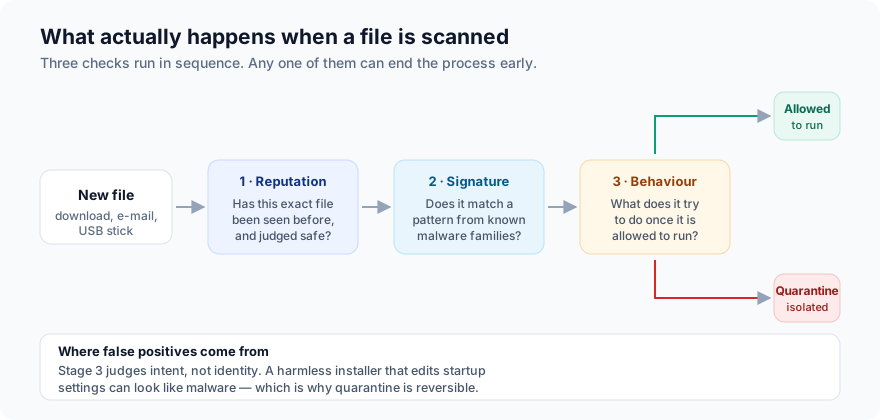
If reputation is inconclusive, signature matching runs. A signature is a pattern — a sequence of bytes, a structural quirk — that identifies a known malware family. This is the classic technique the word “antivirus” was coined for. It is close to certain when it fires, and completely blind to anything released after the last definition update reached your machine. That blindness is not a flaw in any particular product; it is inherent to the method.
Which is why the third test exists. Heuristic and behavioural analysis looks at what a file is built to do, and at what it actually does once running: does it try to encrypt documents in bulk, inject itself into another process, disable recovery snapshots, contact an address associated with command-and-control traffic? These are the techniques that can stop something genuinely new. They are also the techniques that produce false positives, because they judge intent rather than identity, and an unusual but entirely legitimate program can look guilty.
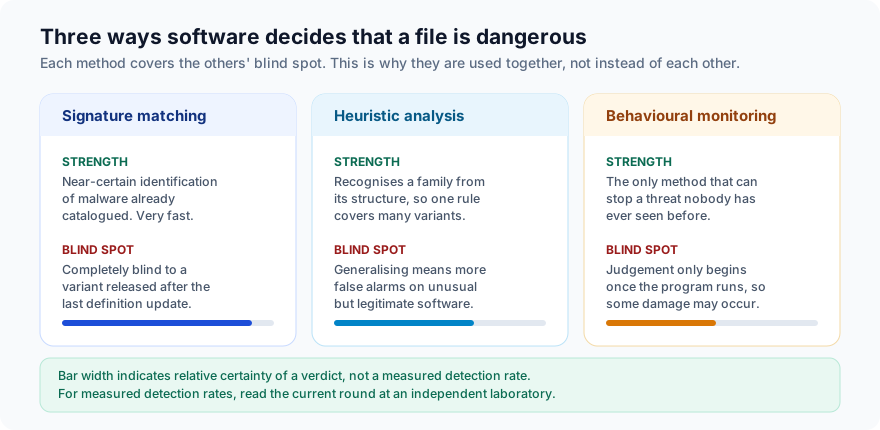
Any page — including the earlier version of this one — that tells you a product “blocks known and emerging threats before they can take hold” is overstating what is technically possible. No product detects everything. The honest version is that a good product detects the large majority of what an ordinary user will encounter, catches some novel threats through behaviour, and misses a residue. Planning for that residue — backups, above all — is the part no subscription can do for you.
Real-time protection vs. an on-demand scan
This is the single most important distinction in the product category, and the one most often blurred in advertising.
An on-demand scan is a search you start. It walks the disk, tests what it finds, and reports. It is useful for answering “is something already on this machine?” It does nothing between scans.
Real-time protection hooks into the operating system so that every file is tested at the moment it is written, opened or executed. This is what actually prevents an infection, rather than discovering one afterwards. It is the feature that matters.
In this market, free tiers have generally offered on-demand scanning only, with continuous real-time protection reserved for the paid subscription. TotalAV has followed that pattern. Because vendors change tier boundaries, confirm the current free-tier feature list on TotalAV’s own page before assuming a free install leaves you continuously protected. If it does not include real-time protection, a free install is a diagnostic tool, not a shield — and on Windows you would in that case be better off leaving Microsoft Defender’s real-time protection switched on.
Partner link. If you subscribe after following it, we are paid a commission by the advertiser. You pay exactly the same price either way, and it does not affect what we write.
Where antivirus sits among your defences
Security people think in layers, and it is a genuinely useful frame for a buyer. A threat that reaches your files has passed through several independent opportunities to be stopped. An antivirus subscription buys you some of those layers. It does not buy you all of them, and the last one is the one that saves you when the others fail.
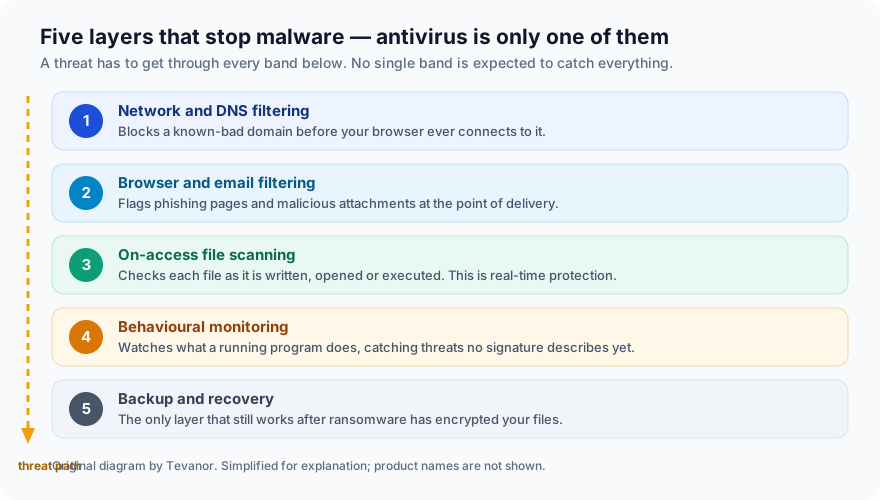
If you take one practical thing from this page, make it that bottom band. A current backup, kept somewhere that ransomware cannot reach from your PC — an external drive you unplug, or versioned cloud storage — converts a catastrophe into an afternoon. No security subscription, at any price, from any vendor, offers an equivalent guarantee.
Clean-up and “performance boost”, honestly
The optimisation half of an all-in-one suite is where advertising copy is at its loosest, so let us be precise about the mechanism.
A clean-up tool deletes files the system no longer needs: browser caches, installer remnants, crash dumps, thumbnail databases, old update files. That genuinely recovers disk space. How much depends entirely on your machine — on how long since the last clean, how you browse, and what you have installed. It can be a few dozen megabytes; it can be a great deal more. Any specific figure quoted in an advertisement is a figure from someone else’s computer.
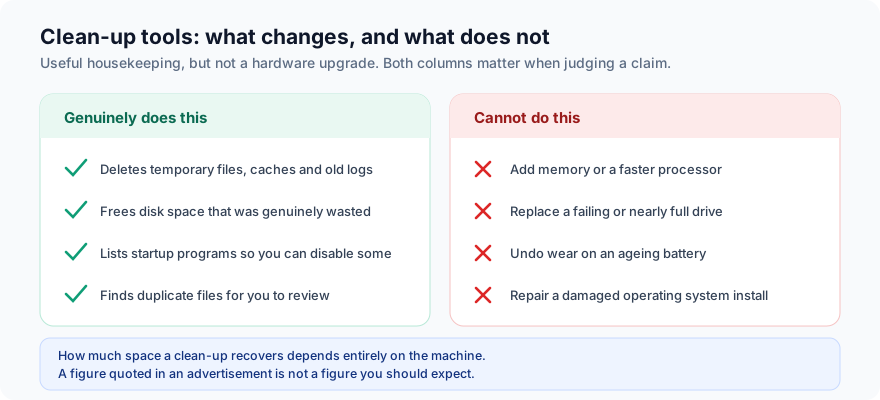
Where does the perceived speed-up actually come from? Two places, mostly. One is disk space: a drive that is nearly full does slow down, so freeing space on a machine that was at ninety-something per cent capacity produces a real improvement. The other is the start-up manager. Programs that launch at boot and sit resident consume memory and CPU permanently. Disabling the ones you do not need is the single most effective software change most people can make to a sluggish computer — and, worth saying plainly, both Windows and macOS include a start-up manager of their own at no cost.
What clean-up cannot do is add memory, make a processor faster, revive a failing drive, or undo battery wear. If your computer is slow because it has 4 GB of RAM and a mechanical hard disk, the honest answer is a hardware upgrade, and any product suggesting otherwise is selling you something.
Web filtering and phishing
Statistically, the more likely way an ordinary person loses money online is not a virus. It is being persuaded to type a password or a card number into a page that is not what it appears to be. Web-protection components address this by checking each address you visit against a list of known-malicious and known-phishing sites and interrupting you before the page loads.
This works well against campaigns that have already been reported and listed. It works less well in the first hours of a new campaign, before anyone has reported it — which is why the skill below remains worth having regardless of what you have installed.
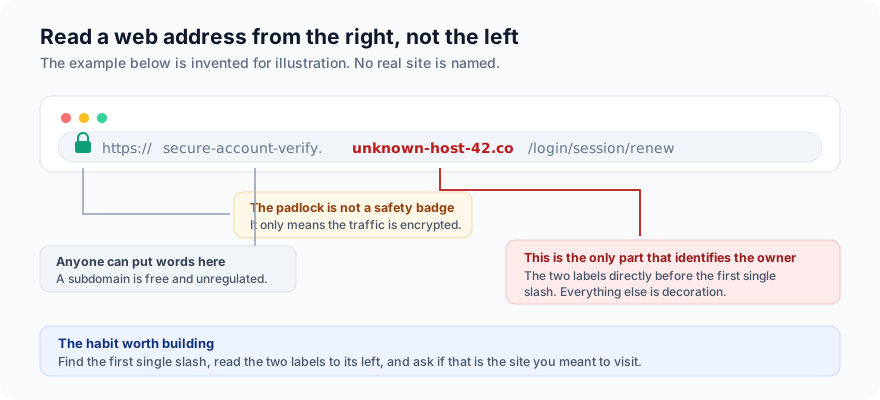
Two corrections to widespread beliefs. The padlock icon means the connection is encrypted. It says nothing whatsoever about who is on the other end — certificates are free, and criminals use them. And a web address is read from the right: find the first single slash, and the two labels immediately to its left are the registered domain. Everything before that can be any words at all, chosen by whoever registered the domain, at no cost and with no oversight.
Partner link. If you subscribe after following it, we are paid a commission by the advertiser. You pay exactly the same price either way, and it does not affect what we write.
The VPN, the vault and the breach check
Three bundled extras, each genuinely useful and each routinely oversold.
The VPN
A VPN encrypts your traffic between your device and the VPN provider’s server. It therefore hides what you are doing from the local Wi-Fi network and from your internet provider, and it presents websites with the server’s location instead of yours. That is a real privacy gain on an untrusted network and a real way to reach region-restricted content. What it does not do is make you anonymous: the sites you log in to still know who you are, and you have moved your trust from your internet provider to the VPN operator rather than eliminating it. Judge a bundled VPN on the provider’s logging policy, not on the word “VPN”.
The password vault
The vault is arguably the most valuable component in any suite of this kind, because password reuse is the mechanism behind a large share of consumer account compromises. A vault lets every account have a different long random password without you memorising any of them. If a bundled vault is the thing that finally gets you off reused passwords, it has earned the subscription on its own. Do check whether it exports in a standard format, so that leaving later is not a trap.
The breach check
A breach check tells you whether your e-mail address appears in a corpus of publicly known data breaches. Useful as a prompt to change something. Note the limits: it can only report breaches that are publicly known and in that corpus, so a clean result is not proof that nothing has happened. Free services offer the same lookup.
Four platforms, four different products
“Protects all your devices” is true in the sense that you can install something everywhere. It is misleading if it leads you to expect identical protection, because operating systems differ in what they permit an app to do.
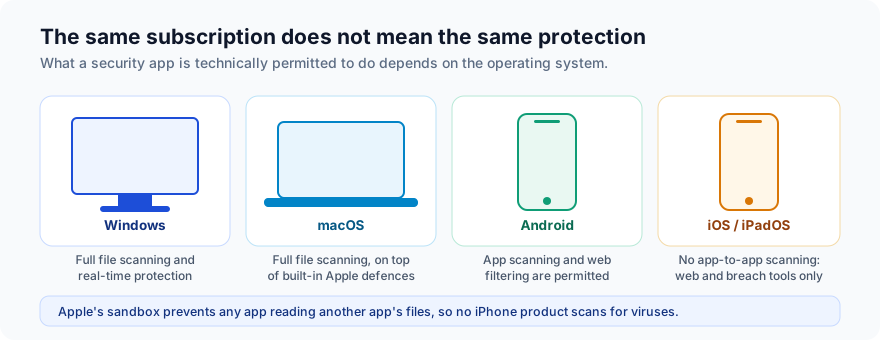
On Windows a security product has deep access and can do everything described above. On macOS it can scan files too, layered on top of Apple’s own Gatekeeper and XProtect. On Android apps may inspect other installed apps and filter web traffic. On iOS and iPadOS, Apple’s sandbox prevents any app from reading another app’s files at all — so no iPhone security app, from any vendor, scans for viruses in the way a Windows product does. What an iOS app can offer is web filtering, a VPN and breach alerts. That is worth having; it is not antivirus, and any vendor implying otherwise is misrepresenting the platform.
Do you need this alongside Defender or XProtect?
A fair question that advertising tends to avoid. Microsoft Defender is included with Windows, switched on by default, and has scored respectably in independent laboratory testing for several years now. macOS includes Gatekeeper and XProtect. The old advice that built-in protection was inadequate is out of date.
So the honest case for a paid suite is not “you are unprotected without it”. It is narrower and more specific:
- You want the bundle — VPN, vault, breach monitoring, clean-up — under one subscription and one interface, rather than assembling and paying for them separately.
- You want a single dashboard covering a household of mixed devices, including phones, where the built-in tools do not reach.
- You want human support to call when something goes wrong, which the built-in tools do not provide.
- You want the more aggressive web and phishing filtering that a dedicated browser component provides.
If none of those describes you, Defender plus a good backup plus scepticism about links is a defensible position, and we would rather say so than pretend otherwise.
What the independent labs measure
Marketing copy is not evidence. Independent laboratory testing is the closest thing this industry has, and the two names that matter are AV-TEST (Magdeburg, Germany) and AV-Comparatives (Innsbruck, Austria). Both publish methodology and results publicly and free of charge.
We deliberately do not reprint a score here. Lab results are published per product, per version, per month and per platform; a number copied onto a page like this is stale almost immediately and can easily flatter a product by being from its best round. Instead, go to the lab, find the current round, and read three things:
| What to look at | Why it matters | What a weak result looks like |
|---|---|---|
| Protection | Share of real-world threats blocked, including zero-day samples delivered by web and e-mail. | Consistently below the tested field’s average across several rounds. |
| False positives | How often clean software is wrongly flagged. A product that blocks everything scores perfectly on protection and is unusable. | A false-positive count far above peers. |
| Performance | Measured slowdown on launching apps, copying files and browsing. | Large measured impact on a low-end reference machine. |
Check whether the specific product you are considering appears in the current round at all. Vendors submit voluntarily, and absence from a round is itself information — neither damning nor reassuring, but worth noticing.
Introductory price, renewal price
This is the part of the transaction most likely to generate a complaint later, so we will state it plainly rather than bury it.
Consumer security is almost universally sold as a discounted first term followed by automatic renewal at a standard rate that is typically higher — often substantially higher — than the price you first paid. This is a normal and lawful commercial model. It causes problems only when the buyer does not register it at the time of purchase.
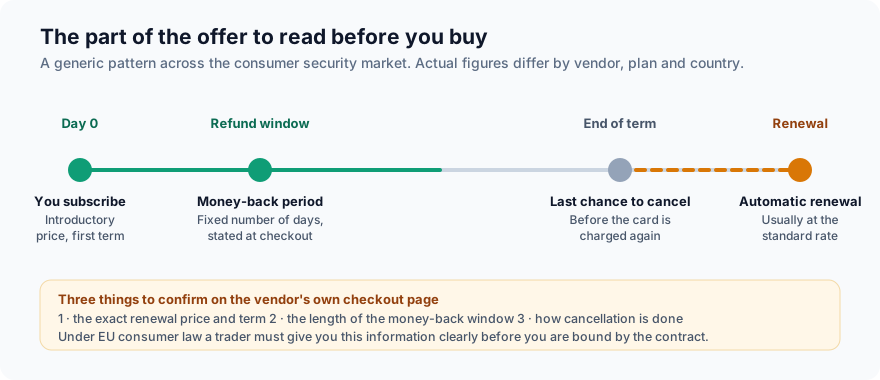
Before you complete any purchase — through our link or anyone else’s — confirm these three things on the vendor’s own checkout page, where they are legally required to be stated clearly:
- The renewal price and term. Not the introductory price. The figure that will be charged automatically at the end of the first period.
- The money-back window. Its exact length, and what it covers.
- How to cancel. Where the setting lives, and whether cancelling can be done in the account area without contacting support.
If you are buying as a consumer in the European Union, the Consumer Rights Directive requires the trader to give you the total price, the duration of the contract and the conditions for terminating it, clearly and before you are bound. For digital content supplied immediately, the ordinary 14-day right of withdrawal can be waived, but only where you have expressly consented and acknowledged that you lose it — so read the checkbox rather than clicking past it. Any vendor money-back guarantee is offered in addition to your statutory rights and does not replace them. Your contract for the product is with the vendor, not with us.
Who it suits — and who should skip it
A reasonable fit if…
- You want several security functions in one subscription and one interface, and you value not having to assemble them.
- You are buying for a household — a mix of Windows, Mac and phones — and want one place to see it all.
- You are not confident troubleshooting a computer alone and want support you can contact.
- You currently reuse passwords, and a bundled vault would end that.
Probably not worth it if…
- You already pay for a VPN and a password manager you are happy with. You would be buying them twice.
- Your only device is an iPhone. The sandbox limits mean you are buying web filtering and a VPN, not antivirus — buy those on their own merits.
- You are comfortable with Defender, keep offline backups and are careful with links. The marginal gain is small.
- Your computer is slow because of its hardware. Spend the money on an SSD or more memory instead.
Partner link. If you subscribe after following it, we are paid a commission by the advertiser. You pay exactly the same price either way, and it does not affect what we write.
Evaluating any security suite in ten minutes
A method you can apply to any product in this category, ours included.
- Find it in a current lab round. AV-TEST or AV-Comparatives, this year, your platform. Read protection, false positives and performance together.
- Read the renewal price, not the headline price. Multiply it by the number of years you realistically expect to keep it.
- Check what the free tier actually includes. Specifically whether real-time protection is in it.
- Check the platform detail. Confirm what the mobile app does on your actual phone, rather than assuming parity with the desktop app.
- Read the VPN’s logging policy if you intend to use the VPN for privacy rather than convenience.
- Find the cancellation path before you subscribe. If you cannot find it described, that is your answer.
- Test support once. Ask a pre-sales question and see how the answer reads.
- Ignore star ratings on pages that earn commission. Including, on principle, ours — which is why this page does not publish one.
Habits that matter more than any product
Written by people who are paid when you buy software, and still true.
- Apply updates. Most successful attacks use a flaw that was patched months earlier. Automatic updates on the operating system and the browser are worth more than any add-on.
- Back up, and keep one copy offline. The only defence that survives ransomware. Test that a restore actually works, once.
- Turn on two-factor authentication for e-mail first. Whoever controls your e-mail can reset everything else.
- Stop reusing passwords. Any manager — bundled, standalone, or the one in your browser — is better than reuse.
- Treat urgency as a warning sign. “Your account will be closed in 24 hours” is a manipulation technique, not a deadline. Navigate to the site yourself instead of following the link.
- Install from official sources. Bundled adware from download portals causes more everyday grief than exotic malware.
Frequently asked questions
Is a paid antivirus still necessary in 2026?
Necessary is too strong for a Windows user who keeps Defender on, applies updates and keeps backups. The case for a paid suite is the bundle, the household coverage, the support line and the stronger web filtering — not the claim that you are defenceless without it.
Does the free version protect me continuously?
Generally not. Free tiers in this market typically offer on-demand scanning while reserving real-time protection for paid plans. Confirm the current scope on the vendor’s page. If real-time protection is not included, leave your operating system’s own real-time protection enabled.
Will it slow my computer down?
Any real-time scanner costs some performance; the question is how much. That is measured by the independent labs under “performance”, on reference hardware. Look there rather than at marketing adjectives like “lightweight”.
Can I run it alongside another antivirus?
Running two real-time scanners at once is generally a bad idea — they interfere with each other and can each flag the other. Windows normally handles this by standing Defender down when a third-party product registers itself. Do not force both on.
How do I cancel?
Through your account with the vendor, according to the vendor’s terms. We are an independent publisher with no access to anyone’s subscription, billing or support records, so we cannot cancel, refund or look up an order for you. Contact TotalAV’s own support.
Why are there no star ratings or user reviews here?
Because this page earns a commission, a score we assign to the product we are paid to advertise would not be independent, and a user review we could not verify would not be evidence. We publish neither. See our editorial policy.
Does this site track me?
No. It sets no cookies, stores nothing in your browser, loads no analytics, no pixel and no third-party resource of any kind. Our cookie policy explains how to confirm that yourself in about thirty seconds.
Sources and corrections
This article draws on publicly available documentation and on the published methodology of the independent testing laboratories. Where a claim could not be verified, it is hedged or omitted rather than asserted.
- AV-TEST Institute — consumer product test results and methodology: av-test.org
- AV-Comparatives — real-world protection, performance and false-alarm tests: av-comparatives.org
- TotalAV — the vendor’s own product pages, feature lists, pricing and terms. Authoritative for anything product-specific.
- Directive 2011/83/EU on consumer rights, as amended by Directive (EU) 2019/2161, on pre-contractual information and the right of withdrawal.
- Apple Developer documentation on application sandboxing, for the iOS limitation described in Figure 6.
This page replaces an earlier version that we judged to be misleading. We removed several specific claims that could not be substantiated: that a single clean-up frees “several gigabytes”; that set-up takes “under two minutes”; that “most users complete the first scan in under ten minutes”; and that the product presents “no confusing pop-ups or aggressive upgrade prompts”. We corrected the platform description, which omitted the mobile apps and the iOS limitations; qualified a claim that threats are blocked “before they can take hold”; corrected a description of the privacy features; added the renewal-pricing disclosure; and removed the framing of the page as a reader-submitted story, which it never was. If you find a remaining error, write to info@tevanor.online and we will correct it under our corrections procedure.
Written and edited by Karen Taylor, responsible editor, and published by CLEAN INŽENÝRING s.r.o. (Světova 523/1, Libeň, 180 00 Praha 8; company number 07354550). First published 25 September 2026; last reviewed 25 September 2026. This is an independent, advertising-funded publication. It is not affiliated with, endorsed by or sponsored by TotalAV or Protected.net. Where anything here diverges from the publisher’s own information, the publisher’s information prevails. Nothing on this page is legal, financial or professional advice.